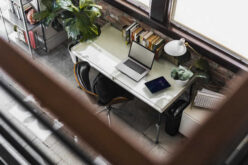
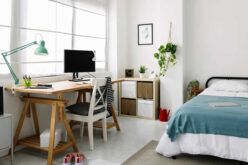
Finding a quiet corner, managing distractions, and then packing it all away at the end of the day can add stress to an already busy schedule. The good news is that creating a functional, temporary home office doesn’t have to be complicated or require a permanent overhaul of your living space.
With a few thoughtful choices, you can design a quick workspace setup that helps you switch into work mode, stay focused, and maintain a healthy boundary between your professional and personal life.
This guide will walk you through creating an effective temporary office, transforming any small part of your home into a hub of productivity that you can easily set up and take down.
Choosing the Right Space
The first step in creating your temporary home office is finding the perfect spot. The ideal area is one that you can easily transform and, just as importantly, reclaim as personal space when the workday is over.
You don’t need a dedicated room; a quiet corner, a section of your kitchen counter, or even a spare bedroom can work beautifully. The goal is to identify a location that supports focus and comfort, making your work-from-home days as seamless as possible.
-
Finding a Zone of Minimal Distraction
A peaceful environment is essential for a productive workday. When selecting your temporary workspace, consider areas of your home that are naturally quieter and away from the main hustle and bustle. Think about the daily rhythms of your household.
Is the living room a high-traffic zone during the day? Perhaps a corner of your bedroom or a less-used dining area would be a better fit.
Using noise-canceling headphones can be a simple yet powerful tool to block out household sounds and signal to others that you are in work mode.
By choosing a space with minimal distractions, you create a psychological boundary that helps you concentrate on your tasks.
-
Prioritizing Temporary Ergonomics
Even a temporary setup should be comfortable and supportive to prevent aches and pains. Ergonomics is just as important when you work from home for a day as it is in a traditional office.
Choose a chair that provides good back support—your dining chair might be a better option than the sofa. Ensure your screen is at eye level to avoid neck strain; propping your laptop on a stack of books is a simple fix.
Your feet should rest flat on the floor, and your wrists should be in a neutral position when typing. A foldable table and chair can be a great investment, offering a dedicated and comfortable setup that can be stored away easily.


Assembling Your Essential Equipment
Once you’ve chosen your space, it’s time to gather the tools you need for a functional temporary office. A well-equipped workspace doesn’t require a lot of fancy gear. The focus should be on essential items that support your productivity and can be packed away neatly.
A rolling cart is an excellent solution for keeping your supplies organized and mobile, allowing you to move your office essentials to and from your chosen spot with ease.
-
Your Laptop and Key Accessories
Your laptop is the heart of your workspace, but the right accessories can make a significant difference in your comfort and efficiency. An external mouse and keyboard can greatly improve your ergonomic setup, preventing wrist strain and allowing for more natural posture.
Make sure your laptop is reliable and all necessary software is up to date before your work-from-home day begins. Having these core items ready to go streamlines your morning setup, letting you get straight to work.
-
The Importance of Good Lighting
Adequate lighting is crucial for reducing eye strain and maintaining energy levels throughout the day. Natural light is ideal, so if possible, set up your temporary office near a window.
If natural light isn’t an option, a good desk lamp can provide the focused light you need. Consider using smart bulbs that allow you to adjust the brightness and color temperature.
A cooler, brighter light can help you stay alert during the day, while a warmer tone can signal that it’s time to wind down. Integrating smart home technology like automated lighting can enhance your temporary setup by creating an optimal work environment with minimal effort.

Creating The Perfect Home Office Set-up In Small Spaces
Setting up a work-from-home office can be tricky if you have limited space. To make a small home office set-up, you must be creative and use all the space available wisely.
Maintaining Productivity and Balance
Working from home blurs the lines between professional and personal life. Establishing clear routines and boundaries is key to staying productive and preventing burnout.
The psychological benefit of having a dedicated workspace, even a temporary one, is significant. It creates a mental cue that it’s time to work. Reinforcing this with simple rituals can make the transition even more effective.
-
Setting Clear Boundaries
Creating a distinct separation between your work and personal life is one of the biggest challenges of a flexible work arrangement. A "work ritual" can be incredibly helpful.
This could be as simple as making a cup of tea before you start your day, getting dressed in work-appropriate attire, or taking a short walk before you "commute" to your temporary desk.
At the end of the day, pack away your work equipment. This physical act of putting your office away signals that the workday is over, allowing you to fully disengage and enjoy your personal time.
Involving family members in this process can also foster a sense of collaboration and respect for everyone’s needs.
-
Mastering Your Time
Effective time management is vital when working from home. Without the structure of a traditional office, it’s easy to get sidetracked. Use techniques like the Pomodoro method—working in focused 25-minute intervals with short breaks in between—to maintain concentration.
Keep a clear to-do list and prioritize your tasks for the day. Setting specific, achievable goals helps you stay on track and provides a sense of accomplishment. By managing your time wisely, you can ensure your work-from-home days are both productive and fulfilling.
Craft Your Dream Workspace, One Day at a Time
Setting up a temporary home office is a practical and empowering way to embrace the flexibility of modern work. It doesn’t require a large investment or a permanent change to your home’s layout.
By thoughtfully choosing your space, gathering essential equipment, and establishing healthy routines, you can create a productive and comfortable environment whenever you need it.
This simple approach allows you to harness the benefits of working from home while protecting your personal time and space, helping you find a better, more harmonious work-life balance.
other related analysis of interest: (new win)
Kitchen Countertop Appliances: Essential Tools for Modern Food Preparation
What Is Eco-Living? Your Guide to Sustainable Daily Practices
| Category | Key Takeaways | Tips/Recommendations |
|---|---|---|
| Choosing the Right Space | Find a location that can easily transform into a workspace and be reclaimed as personal space after work. | Consider quiet corners, spare rooms, or even sections of the kitchen or dining area. |
| Minimizing Distractions | A peaceful environment is critical for focus and productivity. | Choose low-traffic spots and use tools like noise-canceling headphones to reduce household noise. |
| Temporary Ergonomics | Comfort and posture support are crucial, even for short-term setups. | Choose chairs with good back support and adjust screen height using books or stands. Keep feet flat on the floor. |
| Essential Equipment | A laptop is the core, but accessories like external keyboards and mice improve ergonomics and efficiency. | Use a rolling cart for portability and organization of office supplies. |
| Lighting | Proper lighting enhances focus and reduces eye strain. | Set up near natural light or use adjustable desk lamps with smart bulbs for flexibility. |
| Productivity and Balance | Clear routines and boundaries prevent burnout while working from home. | Establish rituals like packing away equipment after work and set achievable, prioritized goals using methods like Pomodoro. |
Find Interior Design Services Decorators Interior Designers Furniture Painting & Staining top-rated, pre-screened local contractors FREE: download contractor selection enter zip code – powered by HomeAdvisor ™


Image credit: temporary home office by envato.com
end of post … please share it!
| more photo remodeling |
Jump Over to Our Photo Analysis Center for Ideas on
"Renovating Home"
|__________________________________________________________|
home remodeling surprise
find out where it might go - new win


Helpful article? Leave us a quick comment below.
And please share this article within your social networks.